


What Does 320kbps Actually Mean? A Simple Guide to MP3 Quality
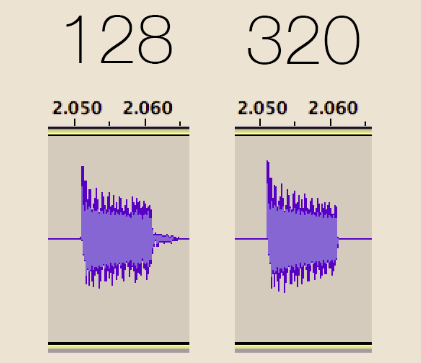
If you've ever downloaded a song and seen the number "320kbps" next to it, you might have wondered what it actually means, and whether it's something you should care about. The short answer is yes, it matters more than you might think, and once you understand it, choosing the right audio quality becomes much easier, no matter what app or converter you happen to be using.
Let's break this down in plain, simple language.
What Does "kbps" Mean?
kbps stands for kilobits per second. It's a way of measuring how much audio data is packed into each second of a song. Think of it like a hose carrying water. A wider hose lets more water flow through every second, while a narrow hose limits the flow. In the same way, a higher kbps number means more audio detail is flowing into each second of sound.
Common MP3 qualities you'll see include:
- 128kbps: A smaller, more compressed file. Sounds okay, but you may notice a slight loss of detail, especially in busier songs.
- 192kbps: A noticeable step up, sounding clearer with most instruments and voices.
- 320kbps: The highest standard MP3 quality. This is about as close to the original recording as MP3 compression allows.
Why 320kbps Is Considered the "Sweet Spot"
MP3 files work by removing small bits of sound that most human ears don't easily notice, which is how they stay smaller than formats like WAV. The problem is that lower kbps settings remove more of that detail, which can make music sound slightly thin, especially in headphones or good speakers.
At 320kbps, very little gets removed. Most listeners, even those with a trained ear, struggle to tell the difference between a 320kbps MP3 and the original studio recording. This is exactly why it's become the standard choice for anyone who wants strong audio quality without the much larger file size of an uncompressed format like WAV.
A Simple Comparison
Picture three versions of the same photo. One is a small, blurry thumbnail. One is a decent, everyday photo. And one is a crisp, detailed, full-size image. That's roughly the difference between 128kbps, 192kbps, and 320kbps audio. The content is the same song, but the amount of detail you actually hear changes with each step, the same way a blurry thumbnail still shows you the subject, just without the fine detail of the full image.
When 320kbps Makes the Most Difference
Higher bitrate matters more in certain situations than others.
It matters a lot for:
- Music with lots of instruments playing together, like orchestral or electronic tracks
- Listening through good headphones or speakers, where small details are easier to notice
- Songs with wide dynamic range, from very quiet to very loud moments
It matters less for:
- Spoken word content, like podcasts or audiobooks, where fine musical detail isn't as important
- Listening through small phone speakers, which can't reproduce fine detail anyway
- Casual background listening while doing other tasks
How to Get 320kbps When Converting YouTube Audio
If you're pulling audio from a YouTube video and want the best possible MP3 quality, the key is choosing a converter that actually offers a true 320kbps option, rather than labeling a lower-quality file with a misleading number.
A reliable youtube to mp3 converter will clearly show you the bitrate option before downloading, so you know exactly what you're getting instead of guessing. The process itself stays simple: paste the video link, choose 320kbps, and download, with no extra software needed.
Does File Size Matter Here?
Yes, a little. A 320kbps MP3 is noticeably larger than a 128kbps file, roughly two and a half times bigger for the same song. For most people today, with plenty of phone storage and faster internet, this small size difference is a fair trade for noticeably better sound.
If you're saving hundreds of songs and storage space is tight, a slightly lower bitrate like 192kbps can be a reasonable middle ground. But if quality is your priority, especially for music you'll listen to often, 320kbps is worth the extra space, and most phones today have more than enough room to handle it without any trouble.
A Quick Way to Test It Yourself
If you're curious whether you can actually hear the difference, try a simple test. Convert the same short song at 128kbps and again at 320kbps using a yt to mp3 tool, then listen to both back to back through decent headphones, ideally on a song with a lot going on, like a busy chorus with drums, vocals, and multiple instruments. Many people are surprised at how clearly they can tell the two apart once they listen side by side, even if they couldn't describe the difference beforehand.
Common Misunderstandings About Bitrate
A few things trip people up when it comes to bitrate, so it's worth clearing them up.
- Higher bitrate can't fix a bad original recording. If the source audio was already low quality, converting it at 320kbps won't magically improve it, it just avoids adding further quality loss.
- Not all 320kbps files are created equal. Some converters label files as 320kbps without actually encoding them properly at that bitrate, which is why using a trustworthy tool matters.
- Bitrate isn't the only factor in sound quality. Your headphones, speakers, and even the room you're in all play a role in how a song actually sounds.
Final Thoughts
320kbps isn't just a technical number, it's the setting that gives you the closest MP3 experience to the original recording, without jumping all the way up to a much larger uncompressed file. For music you genuinely care about, it's the setting worth choosing.
Next time you're converting audio and see that quality dropdown, you'll know exactly why 320kbps is usually the better pick, and when a lower setting is perfectly fine too, so you can choose with confidence instead of guessing every time.

 English
 Arabic
 French
 Spanish
 Portuguese
 Deutsch
 Turkish
 Dutch
Dutch
 Italiano
 Russian
 Romaian
 Portuguese (Brazil)
 Greek
Greek