
Digital Signature Software: How Businesses Can Build a Smarter Document Workflow
Every business depends on documents to communicate decisions, confirm responsibilities, and complete important agreements. An employee may need to approve a company policy, a customer may need to sign a service contract, or a manager may have to authorise a business purchase. Although these tasks appear simple, managing them manually can take considerable time when several people and departments are involved.
Printing documents, collecting handwritten signatures, scanning completed pages, and sending files through email can create unnecessary administrative work. It can also become difficult to track which documents have been approved and which still require attention.
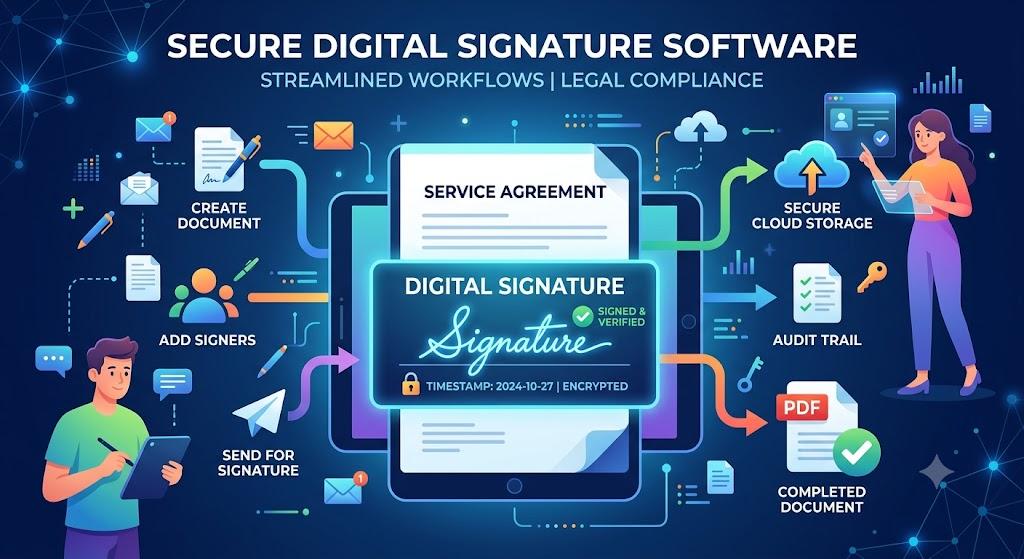
Modern Digital Signature Software provides a more organised approach to handling these activities. It allows users to prepare documents, assign signature fields, send files to recipients, and collect electronic approvals through a digital process.
However, businesses should understand that choosing software is not just about finding a tool that allows someone to draw or type a signature. A useful solution should support document preparation, security, workflow management, record keeping, and the specific needs of the organisation.
1. Why Businesses Need More Than a Basic Signing Tool
A basic signing tool may allow a person to add a signature to a PDF, but business document management usually involves several additional activities. Documents need to be prepared, checked, shared with the correct people, approved, and stored after completion.
Imagine a company hiring a new employee. The process may involve an employment agreement, policy acknowledgements, confidentiality documents, and other forms. Different departments may need to review certain documents before the employee completes the process.
Managing every file manually creates opportunities for confusion. An employee might receive an outdated version, a manager may overlook a pending approval, or the HR department may struggle to locate the completed agreement later.
Digital Signature Software can bring several of these activities into a structured process. Depending on its capabilities, a platform may offer templates, signing sequences, automatic reminders, document status updates, and activity records.
This can help employees understand what action is required and reduce repeated communication about unfinished paperwork.
The purpose is not to eliminate every manual task. Businesses will still need people to review contracts, verify information, and make decisions. Instead, digital software helps organise the administrative steps surrounding those responsibilities.
2. Understanding the Main Stages of a Digital Signing Process
A reliable document workflow usually begins with preparation. The sender should select the correct document, check the content, confirm the recipient details, and decide where signatures or other information are required.
The next stage is setting up the signing process. Some agreements require only one signature, while others need approval from several people. A platform with multiple-signer functionality can help organise these requests.
Signing order is another useful feature. For example, a department manager may need to approve a document before it is sent to an employee. Assigning the correct sequence can prevent the document from reaching the wrong person at the wrong time.
After the document is sent, recipients should receive clear instructions. They should be able to review the complete agreement before signing it. Once the required actions are completed, the sender can access the finished document and store it according to company policies.
An activity record can also help users understand what happened during the process. It may contain information about when the document was sent, viewed, or signed.
Businesses should remember that a signing record is only one part of document accountability. They should also maintain appropriate identity checks, approval policies, and secure storage arrangements.
3. How Education Organisations Can Manage Administrative Documents
Educational institutions handle a wide range of documents throughout an academic year. Student enrolment forms, course agreements, parental acknowledgements, staff contracts, internship arrangements, and examination-related documents may all require approval.
Traditional processes can be challenging when students, parents, teachers, and administrators are located in different places. A student studying remotely may find it inconvenient to visit the campus just to complete routine paperwork.
This is where esignature for education can provide practical value. Schools, colleges, and training organisations can prepare selected forms electronically and send them to the required participants.
For example, a training institute may require students to acknowledge course policies before classes begin. A digital workflow can help collect these acknowledgements and maintain organised records for administrative teams.
Educational institutions can also use templates for commonly repeated documents. This reduces the need to prepare similar forms from the beginning every time a new student joins.
Privacy should remain an important consideration. Student records may contain personal information, so access should be limited to authorised individuals. Institutions should also provide alternative signing arrangements when a student or parent cannot comfortably use the digital process.
A suitable software platform can make educational administration easier while helping staff maintain a consistent approach to document collection.
4. Financial Institutions and the Need for Reliable Document Records
Financial organisations work with documents that often involve payments, contractual responsibilities, personal information, and legal commitments. Banks, insurance companies, lenders, and investment service providers may need to collect signatures at several points during a customer relationship.
An electronic signature financial services workflow can help organisations collect selected customer agreements and approvals digitally. For example, an insurance company may send policy-related documents to a customer for review, while a lending business may use an electronic process for certain application agreements.
A structured workflow can help employees understand which documents have been completed and which are still waiting for customer action. It can also reduce the time involved in sending physical forms between customers and employees.
However, financial records require careful protection. A signature does not automatically verify every detail supplied by a customer. Organisations may need separate identity checks, authentication methods, fraud-prevention procedures, and internal approvals.
Software selection should therefore include a review of encryption, access management, activity records, document retention, and applicable financial regulations.
Financial companies should also confirm whether their chosen signing method is appropriate for the specific agreement. Some documents or transactions may require additional formalities.
The most valuable solution is one that makes customer paperwork easier to handle while supporting proper verification and accountability.
5. Supporting Property Agreements and Real Estate Documentation
Real estate companies often manage documents involving buyers, sellers, landlords, tenants, and property agents. A single transaction can include several agreements, authorisations, acknowledgements, and supporting records.
When these documents are distributed through separate emails and physical copies, tracking their progress can become difficult. A property manager may not know whether a tenant has completed a lease agreement, while an agent may still be waiting for an owner's approval.
Using esign real estate workflows can help property professionals organise selected documents and collect signatures from remote participants. The process may include preparing an agreement, assigning signature fields, sending it to the correct people, and maintaining a completed copy.
Property companies can also benefit from standardised templates for recurring documents, although every agreement should be checked for transaction-specific terms.
When selecting software, real estate businesses should pay attention to multiple signers, signing sequences, mobile compatibility, secure storage, and audit records.
It is equally important to understand local property laws. Some transactions may require notarisation, witnesses, or additional verification. Electronic signing should only be used when the relevant document and process permit it.
This approach makes digital document management useful across different business sectors without treating every agreement as identical.
6. Features Worth Comparing Before Buying Software
Different organisations have different document requirements. A small consultancy may only need a platform for occasional contracts, whereas a large company may handle hundreds of signing requests across multiple departments.
Before purchasing software, identify the number of documents your business processes and the people who need access. This will help you avoid paying for unnecessary features.
Important areas to evaluate include:
Security and access controls: Check whether documents are protected through encryption, authentication, and appropriate user permissions.
Audit trails: Look for records of important document events, including sending, viewing, and signing activities.
Templates and reusable fields: These features can reduce repeated preparation work for frequently used agreements.
Multiple-signer workflows: Useful when approvals are required from different departments or external parties.
Automatic notifications: Reminders can help reduce delays when recipients have not completed their signing tasks.
Integration and compatibility: Consider whether the platform works with your current document management tools and supports the file formats your team uses.
Pricing and customer support also deserve attention. Review any usage limits, storage conditions, or additional charges before selecting a subscription.
Finally, test the software with a small group of users. A practical trial can reveal whether the interface is understandable and whether the platform fits existing working habits.
Conclusion
Document management is an important part of running any organisation. When businesses depend entirely on printing, scanning, and manually tracking signatures, routine administration can become more complicated than necessary.
Digital Signature Software provides a way to organise document preparation, signing requests, approvals, and completed records through a structured digital process. Its value becomes even greater when features such as multiple signers, templates, reminders, access controls, and audit trails are used effectively.
Different industries may require different workflows. Schools can benefit from esignature for education, financial organisations can manage selected documents through electronic signature financial services, and property businesses can organise agreements using esign real estate processes.
The right software should match the organisation's actual requirements while respecting privacy, security, and applicable legal standards. A well-planned approach can help businesses reduce administrative delays, maintain clearer records, and make document-related work easier for employees and customers.


